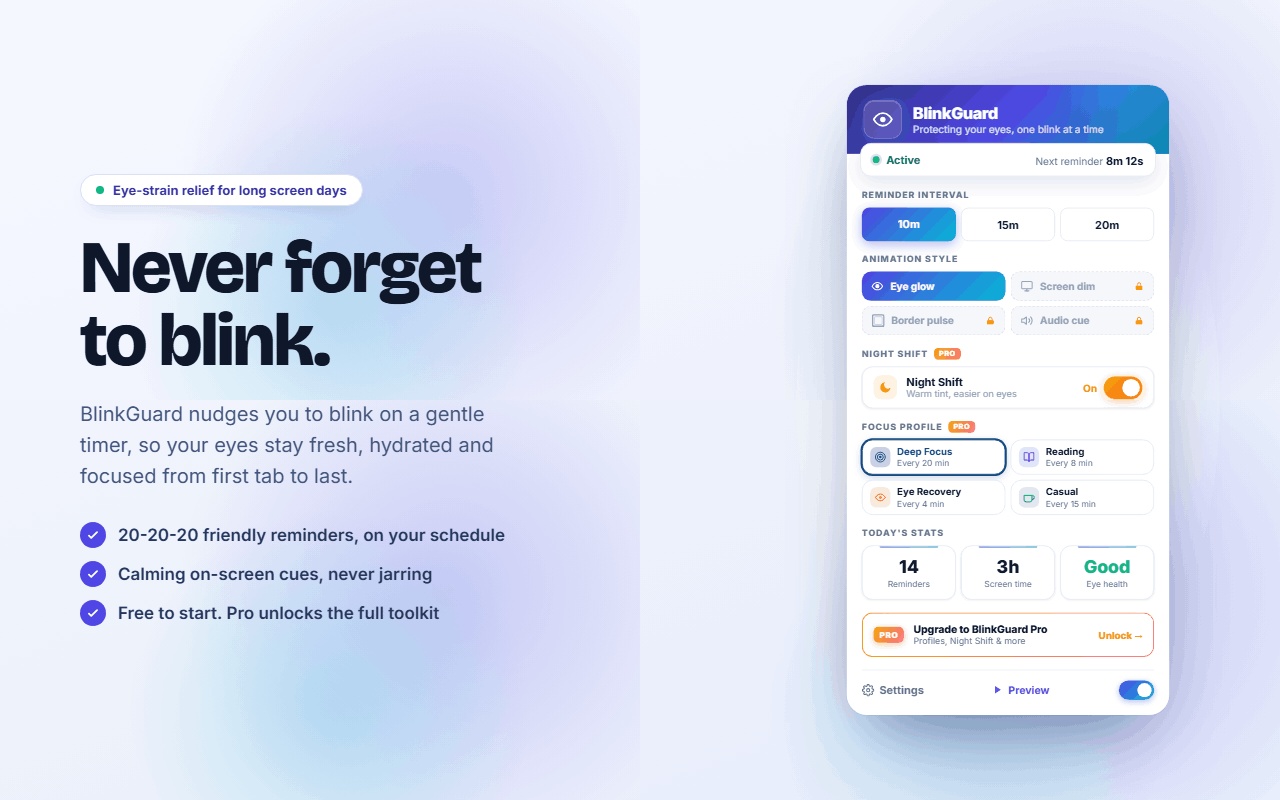
Never forget
to blink.
Deep focus quietly switches off your blink reflex. Your tear film thins, breaks apart, and by evening your eyes burn. BlinkGuard nudges you on a gentle timer so your eyes stay fresh, hydrated and comfortable from the first tab to the last.
A blink is not a twitch. It is how your eye takes care of itself.
If your eyes burn, itch, or feel like sand by the end of a work day, there is usually a simple reason behind it. Here is what is actually happening on the surface of your eye, in plain language.
Three layers, rebuilt every blink
Your tears are not just water. An oily outer layer made in your eyelids slows evaporation, a watery middle layer carries oxygen, nutrients and antibodies, and a sticky mucin base helps the whole thing grip the surface. One full blink repaints all three across your cornea.
The film starts breaking apart in about ten seconds
Left undisturbed, a healthy tear film begins to thin and split into dry patches within roughly ten seconds. At a natural blink rate you never notice, because it is replaced long before that. At a screen rate you spend much of your day inside those dry patches.
Blinking squeezes the glands that stop evaporation
Dozens of tiny meibomian glands line each eyelid. The pressure of a complete blink pumps their oil onto the tear surface, and that oily layer is the main thing holding evaporation back. Blink shallowly for long enough and those glands can clog, which is the leading cause of evaporative dry eye.
Your cornea breathes through your tears
The cornea has no blood vessels, because vessels would blur your vision. It takes oxygen directly from the air through the tear film. So when the film thins out, the surface is not only dry, it is also short of what it needs to stay clear and healthy.
Half a blink does half the job
Under screen load your blinks go shallow and the lids never quite meet. The lower part of the cornea stays uncovered, and that is exactly the region where dryness and irritation tend to show up first. A few deliberate, fully closed blinks spread the film properly again.
You cannot simply remember to blink
The moment you dive back into your work, the reflex fades out again. Willpower does not fix this and it is not a personal failing, it is just how attention works. What actually helps is a small external cue that arrives on schedule and asks almost nothing of you.
Watch a tear film dry out in real time.
This is a simplified model of what sits on the front of your eye right now. Switch between a relaxed blink rate and a screen focused one, and watch what happens to the layer that keeps your vision sharp and your eyes comfortable.
A simplified illustration for explanation, not a measurement of your own eyes. Break up time varies a lot from person to person.
Habits that genuinely help your eyes, whether you install anything or not.
We want your eyes to feel better, full stop. These habits are recommended by eye care clinicians and have been discussed at length by researchers such as Dr. Andrew Huberman, a neuroscientist at Stanford, on his podcast. BlinkGuard makes several of them automatic, but every single one is free.
Blink fully and often
A complete blink, where the lids actually touch, resurfaces your tear film and keeps the eye lubricated. During screen work this reflex fades, so it needs a nudge. This is the core of what BlinkGuard does.
Follow the 20-20-20 rule
Every 20 minutes, look at something at least 20 feet away for 20 seconds. Relaxing the focusing muscles inside your eye reduces the strain that builds up from constant close work.
Give your eyes distance every day
Your eyes evolved for horizons, not for a screen at arm's length. Time spent looking into the distance, ideally outdoors, lets the visual system decompress. A short daily walk where you let your gaze relax and widen does real work here.
Get outside in natural light
Regular time outdoors in daylight is one of the most protective things you can do for long term eye health, and it supports your sleep and your mood as a bonus. Even ten to twenty minutes helps.
Lower your screen slightly
When a monitor sits high, your eyelids stay wider open and more of your eye is exposed to the air. Positioning the screen at or a little below eye level lets the lids relax and slows evaporation.
Warm light in the evening
Bright, cold light late at night is hard on your eyes and on your sleep. Shifting your screen warmer after sunset is kinder on both. BlinkGuard's Night Shift does this automatically.
BlinkGuard supports comfort during screen use. It is not a medical device and it does not diagnose or treat any condition. If you have persistent dryness, pain, or changes in your vision, please see an optometrist or ophthalmologist. Your eyes are worth the appointment.
The free version is genuinely useful. Pro is there when you want more.
We did not hollow out the free tier to force an upgrade. It covers the essentials properly, with no trial timer and no nagging. Pro adds the comfort features for people who live at a screen all day.
Timed blink reminders
Pick a rhythm of 10, 15, or 20 minutes and BlinkGuard keeps it for you all day. The 20 minute setting pairs naturally with the 20-20-20 habit.
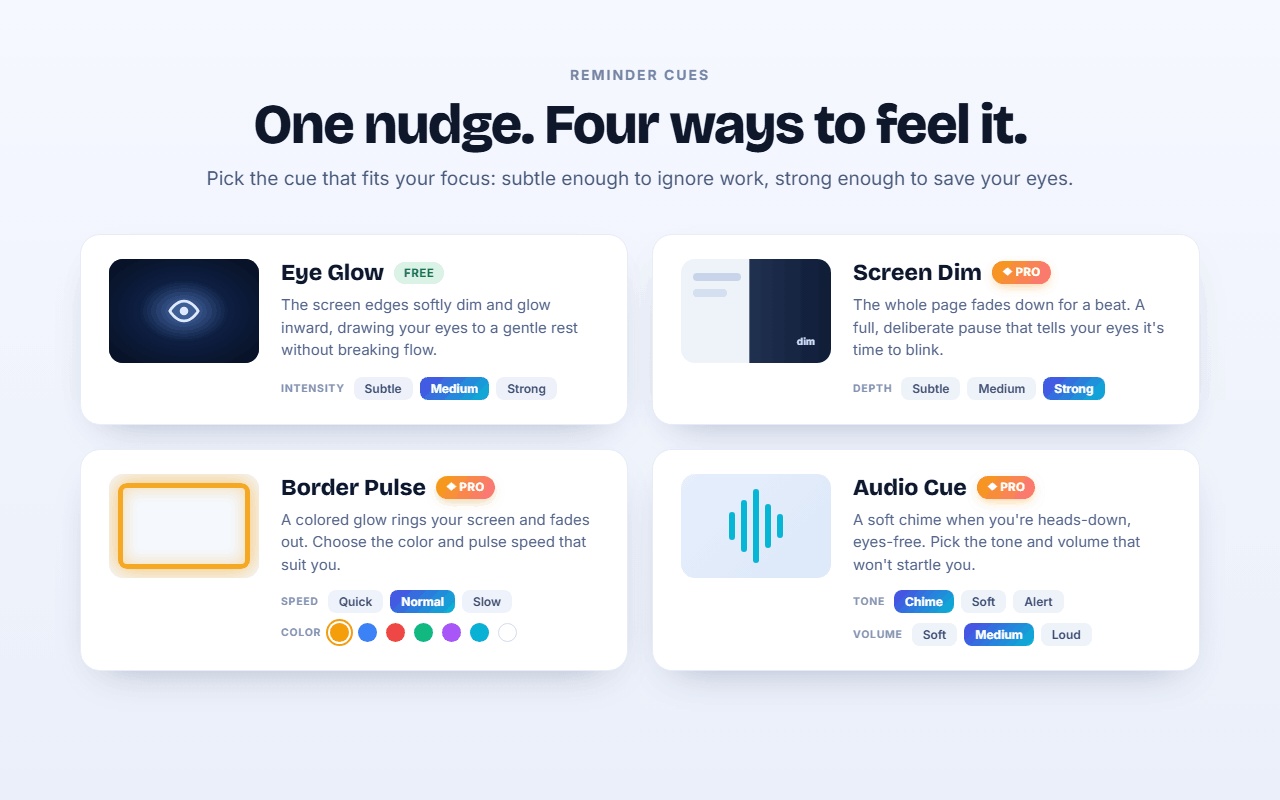
Gentle eye glow cue
No jarring popups. A soft glow eases in at the edge of your screen, you blink fully, and it fades away. Two seconds, no broken concentration.
Today's stats
See your reminders answered, your screen time, and a simple eye health score for the day, right in the popup. What you can see, you can improve.
Every cue style
Swap the glow for a slow screen dim, a soft border pulse in the colour you choose, or a quiet chime. Whatever suits your room and your work.
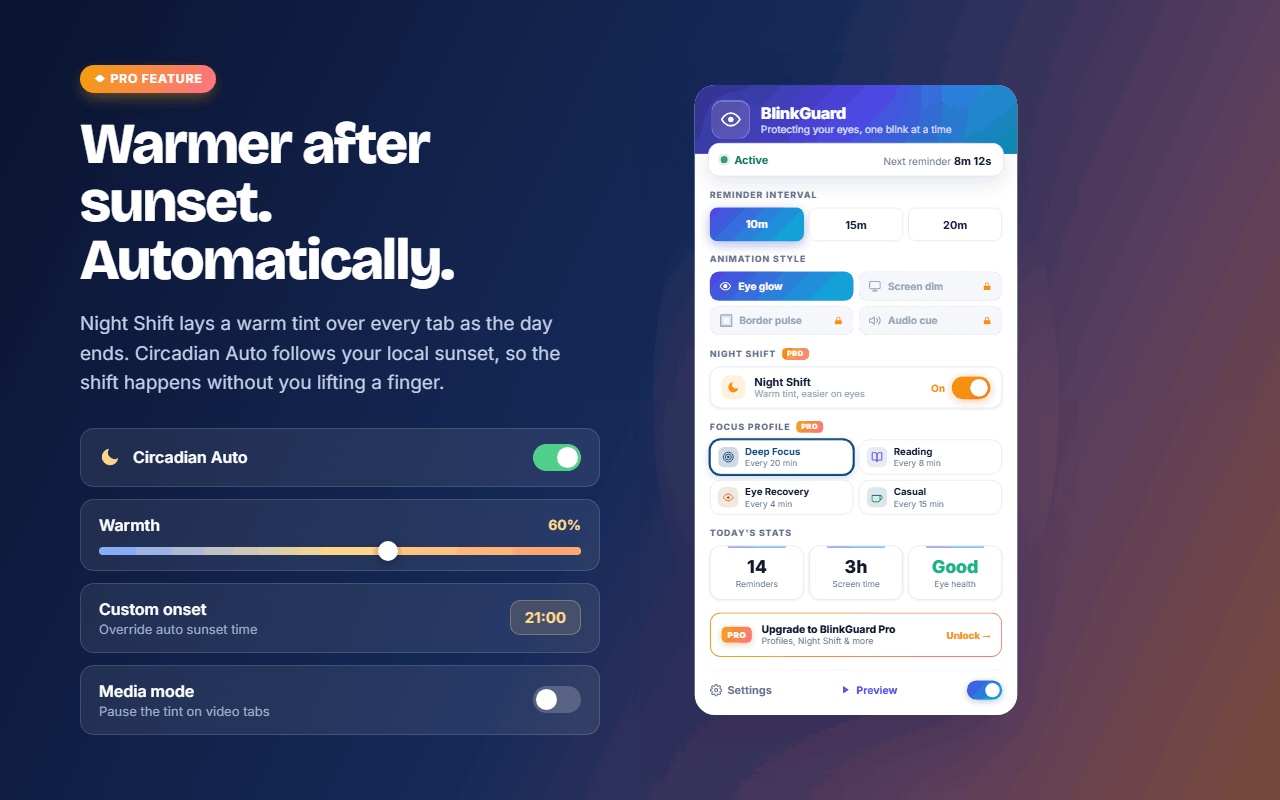
Night Shift with Circadian Auto
A warm tint that eases your screen in the evening. Turn on Circadian Auto and it follows your local sunset by itself, and pauses on video tabs if you ask it to.
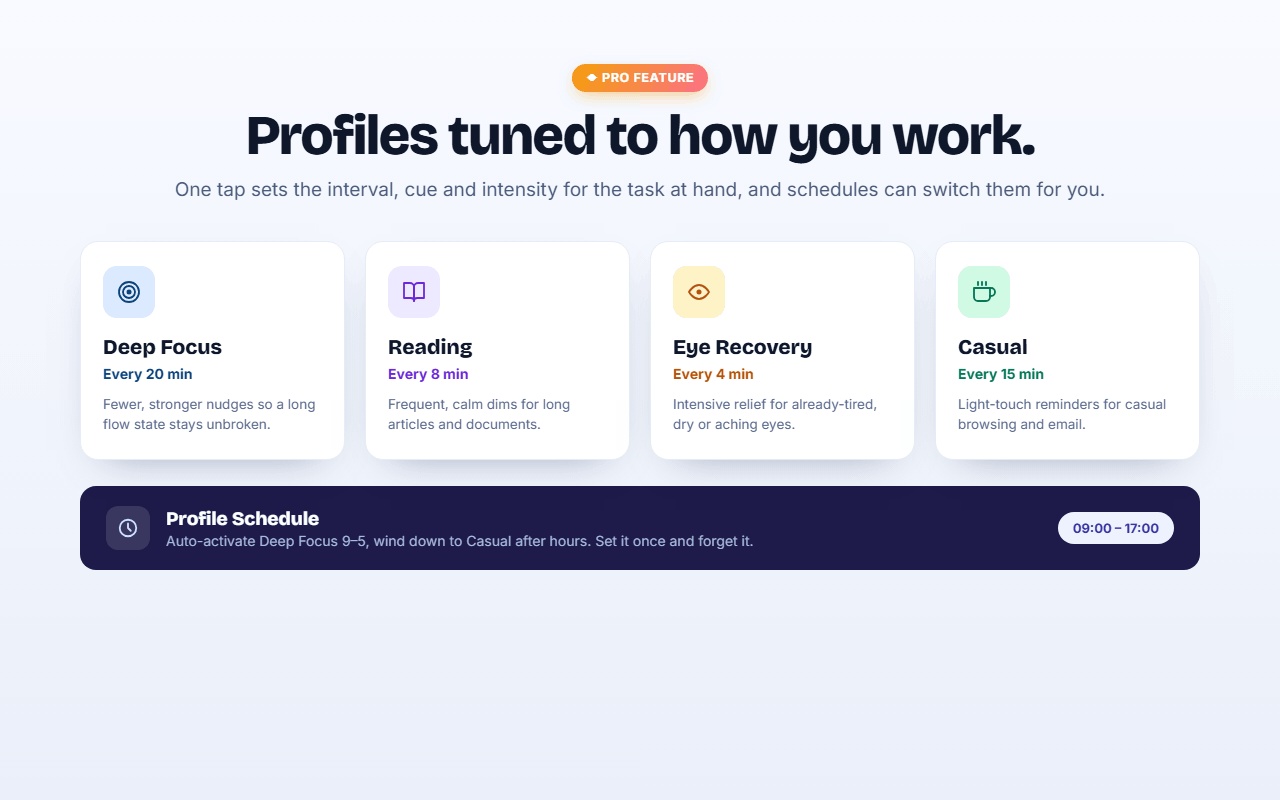
Focus Profiles
One tap presets like Deep Focus, Reading and Eye Recovery that set the right interval, cue and intensity together. Schedule them and they switch on their own.
Fine tuned control
Intensity levels, pulse speeds, cue colours, chime volume and tone. Small dials that make the difference between a reminder you keep and one you uninstall.
Eye health insights
Your daily score and trends over time, so you can see which days and habits leave your eyes feeling best.
Lifetime updates
Pay once and every future Pro feature is included. No subscription, no renewal, no surprise emails asking for more money.
Watch BlinkGuard do its quiet work.
From the popup to the Pro comfort features, here is what BlinkGuard looks like in your browser.
Free does the job. Pro costs less than a coffee and a croissant.
There is no subscription here. If BlinkGuard earns a place in your day and you want the extra comfort features, it is one payment of $4.99 and it is yours for good.
- Blink reminders every 10, 15, or 20 minutes
- Gentle eye glow cue with reminder card
- Today's stats and eye health score
- Everything stays on your device
- Everything in Free
- Screen dim, border pulse, and chime cues
- Night Shift warm tint with Circadian Auto
- Focus Profiles with scheduling
- Eye health insights over time
- All future Pro features included
Not sure yet? Start with the free version. It will still be free next month, and Pro will still be waiting if you want it.
Why I built this
I spend most of my day at a screen, like you probably do. At some point the burning, blurry, end of day eyes stopped feeling normal to me, and when I looked into why it was happening, the answer was almost embarrassingly simple. I had stopped blinking properly, for hours at a time, without ever noticing.
BlinkGuard is the tool I wanted for myself. Nothing about it is complicated. It just remembers the thing your eyes need you to remember, and it does it politely. The free version is genuinely enough for most people, and I mean that. Pro exists for those who want the extra comfort features, and buying it supports one person who cares about making this small tool as good as it can be.
If BlinkGuard helps your eyes feel even a little better at the end of the day, it has done its job. And if something is not working for you, write to me. I read every message.
Nothing about your eyes leaves your browser.
BlinkGuard has no servers, no analytics, and no account system. Your settings and stats live in your browser's own storage and stay there. We are also up front about the permissions the extension asks for, because you deserve to know exactly why each one exists:
The things people ask first.
Will it actually help my dry eyes?
For many people, blinking more fully and more often makes a real difference in day to day comfort, and that is exactly the habit BlinkGuard rebuilds. That said, dry eye can have medical causes that a reminder cannot fix. If your symptoms are persistent or painful, please see an eye doctor. We would rather you get proper care than buy anything from us.
Does it watch me through the camera?
No, and it never will. BlinkGuard works on a simple timer. It does not use your camera, does not track your gaze, and does not read what is on your screen. It reminds you to blink and then gets out of the way.
Will it slow my browser down?
No. Between reminders the extension is essentially asleep. When a reminder fires, it draws a brief, lightweight effect and then goes quiet again. There is no background processing going on.
Is the Pro payment really one time?
Yes. One payment of $4.99 unlocks Pro for good. No subscription, no renewal, no upsell emails. We priced it so that the decision is easy, and every future Pro feature is included.
Why not just use a free timer app?
You can, honestly. But a generic timer interrupts you with a jarring alert, teaches you to ignore it within a week, and knows nothing about eyes. BlinkGuard's cues are designed to prompt a blink without breaking your focus, and features like Night Shift and Focus Profiles are built specifically around how eyes get tired at screens.
What happens to my data if I uninstall?
It disappears with the extension. Since everything is stored locally in your browser and we never receive a copy, there is nothing left behind on any server, because there are no servers.
Your eyes have been working all day.
Give them a hand.
Install BlinkGuard free, set a rhythm, and let your eyes feel the difference by the end of the week.
Add BlinkGuard to Chrome